


Bitfocus released this update to all production sites on November 3, 2026. The full list is in Clarity Human Services: November 2026 Feature Updates. The Feature Focus webinar took place on October 29, and the recording link will be added to that article when it is available.
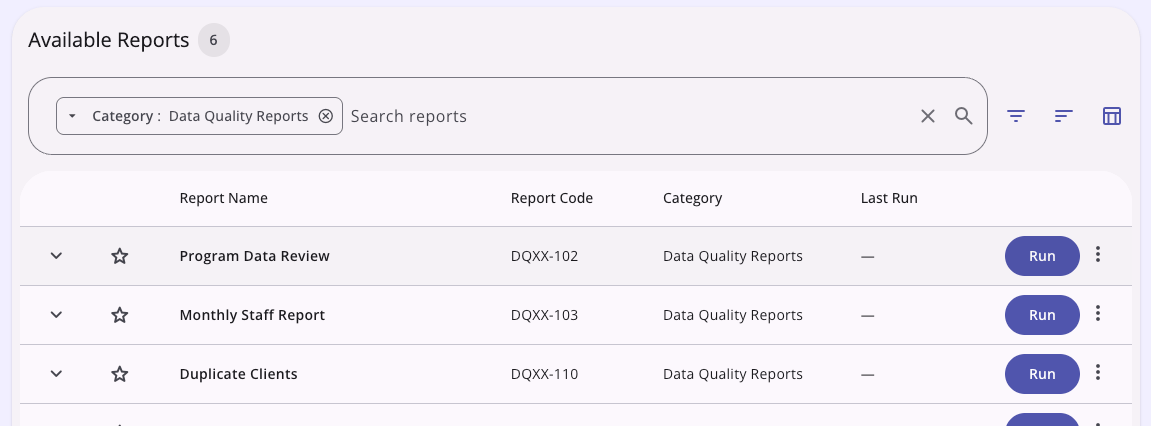
Select Reports in the primary navigation menu to browse, build, or run reports in the new interface. Great new features:
No new permissions are needed. Visibility and report access continue to use your existing access rights. See Reports 101 and The Reports Module in the Help Center.
Report Folder Pro-Tip: The Report Library displays all your accessible reports in a single Available Reports table. You can now locate reports by searching for the Report Name or by using the Filter to browse by Report Category. Click here for more detailed directions on using the Report Library.
The full December release notes will be shared in News & Announcements once finalized. Here is a preview of the upcoming features:
Medicaid Core FieldsAPI Endpoints for Resources:

The 2026 federal reporting season has officially begun. Our team has kicked off data outreach and analysis for two critical HUD Continuum of Care (CoC) reports: the Longitudinal Systems Analysis (LSA) and System Performance Measures (SPM).
Because LSA data serves as the foundation for the SPMs, cleaning up your data during the LSA process directly improves our community’s System Performance Measures.
In last month’s newsletter we shared details about reports you can run to ensure your data is accurate. Over the coming weeks, the Bitfocus team may contact you to review, verify, or update program- and client-level data. You can support this effort by:
Thank you for your ongoing commitment to maintaining timely, complete, and accurate data across our community!

Meet our HelpDesk: Arthur Warmoth
🌟 Where do you live and what’s awesome about it?
Living in Seattle means waking up surrounded by lush evergreen forests and snow-capped mountains that feel close enough to touch, all wrapped in a moody, misty Pacific Northwest atmosphere where local Bigfoot lore and spooky haunted history feel right at home!
What do you like to do in your spare time?
My spare time blends creative world-building, deep research into folklore and philosophy, sci-fi, and historical anomalies, Seattle outings like roller derby, museums, and classic film screenings, and hands-on hobbies like cooking and Mac scripting.
What are you currently watching on Netflix HBO Max?
The Pitt! AKA, the return and fall of Dr. Carter (IYKYK)
Which one would you want most – flying cars, robot housekeepers, or moon cities?
Flying cars. It would be quicker to visit my family in the Bay Area or my kid in Massachusetts.
What’s the coolest thing you’re currently working on? (personally or professionally)
I'm trying to build an archive of people's strange, unexplained experiences across the Pacific Northwest, with the goal of collecting and preserving their stories without trying to prove or debunk them.
🤝 Here for You
Whether you're reaching out with a quick question or launching a new initiative, Arthur and the team are here to support you every step of the way. Need assistance? Connect with us anytime at support@bitfocus.com.
 With LSA season under way, this report shows how complete your data is across your whole system, before HUD does. It uses the same data quality tables as the APR, CAPER, and CE APR, so data quality issues here will match what you see in those federal reports. The report covers:
It also flags invalid SSNs, such as 123456789 or any number starting with 000, 666, or 900-series digits.
How it connects to the LSA. The tables match several elements that HUD checks when it flags your LSA data. Each one has a threshold, and going over it triggers a flag:
| LSA Element | Flag Threshold | Where to look in HUDX-225 |
| Race and Ethnicity | More than 1% missing | Q2, Personally Identifiable Information |
| Disabling Condition | More than 10% missing | Q3, Universal Data Elements |
| Exit Destination | More than 5% missing | Q4, Income and Housing |
HUDX-225 does not cover Prior Living Situation "Type of Residence" or Survivor of Domestic Violence. For those two, use the [GNRL-220] Program Details Report or the Federal Report Data Cleanup Assistance dashboard.
What counts as missing. HUDX-225 counts a response as missing when it is "Data not collected," blank, or when the whole record is absent. The LSA counts more answers for some elements:
Open the drilldown for those elements and check those answers too. An LSA flag can also appear when nothing is missing. This happens if an enrollment falls outside the program's operation dates or HMIS participation dates, or if a night-by-night shelter's start or exit date differs from its first or last bed night.
Why this matters: HUD sets thresholds for the percentage of missing data across a CoC's whole system. A CoC that exceeds them gets flagged, and high levels of missing data affect how usable the community's LSA data is. Every blank or "data not collected" answer you fix now helps your whole community.
Want more information? Check out our Help Center Article.

These meetings discuss the Agency Administrator reports and data collection requirements in HMIS. Additionally, updates regarding changes and/or upcoming changes to HMIS are explored in an effort to ascertain impacts on programs and/or end users. Furthermore breakout sessions allow for exploration of the understanding of ongoing data updates, and/or challenges being experienced by end users. Register here
We know that lots of issues and questions can arise when using Clarity (HMIS) and Looker. Office Hours are a great opportunity to get your questions answered, see demos of anything you can't figure out or can't remember how to do, find out how to fix things that might have gotten messed up, and participate in discussions with other users around solutions to common challenges.
We know that lots of issues and questions can arise when using Clarity (HMIS). Office Hours are a great opportunity to get your questions answered, see demos of anything you can't figure out or can't remember how to do, find out how to fix things that might have gotten messed up, and participate in discussions with other users around solutions to common challenges.

A Homeless Management Information System (HMIS) is an online database that enables organizations to collect data on the services they provide to people experiencing homelessness and people who are at risk for homelessness.
© 2003-2025 Bitfocus, Inc. All rights reserved.
System Administration provided by Bitfocus, Inc. 