


HMIS Newsletter: August 2026


Announcements 


Upcoming DEW - The New Face of Clarity

New Clarity, Who Dis? 🚀 Join Our Live Demo & Level Up Your Workflow

Clarity just got a major glow-up, and we’re giving you the VIP tour. Say goodbye to endless clicking and clunky menus—we’ve streamlined the whole platform so you can breeze through your daily tasks and get back to what actually matters.

What’s in it for you?

  • Express Navigation: A shiny new sidebar that puts your favorite tools front and center.
  • Supercharged Search: Find your records faster than you can find your morning coffee.
  • Frictionless Workflows: Sleek, clutter-free screens built to crush repetitive data entry.

The Details

  • When: Wednesday, September 23 | 1:00 PM – 3:00 PM PST
  • Where: Zoom (Grab your spot below!)

👉 CLAIM YOUR SEAT NOW and register using this link! 


August 2026 Feature Focus  


Released August 10thClarity Human Services logo small


Featured Update: Overnight Unit / Bed Drop-Ins

Communities using Inventory can now place a client in an available, occupied, or pending bed overnight without running a full intake workflow — the original occupant's stay automatically picks back up the next day. System Admins can configure drop-in rules at the Site, Building, or Unit level, and nine new access rights give granular control over who can create, edit, or delete drop-in records.


Other Updates Now Live 

  • Release of Information (ROI) Verification: when a client doesn't have an active ROI on file, the message "Client missing release of information" now displays in the Attendance Service and Reservation workflows.
  • System Emails Refresh: all automated Clarity emails (password resets, new user verification, alert notifications) now carry the new Clarity interface branding and updated Bitfocus contact details.
  • New Report — Staff Details Report [STFF-107]: lists staff members with agency access, including username, access role, email, phone number, and status — useful for staff administration and access reviews.
  • HUD CSV/XML Export Update [HUDX-111]: added Veterans Only, VAMC Filter, and VAMC Station Number(s) parameters, making it easier to isolate veteran-only data for monthly VA Repository and By-Name List reporting.
  • Streamlined Enrollment Workflow: Current Living Situation (CLS) assessments are now integrated directly into the enrollment process for all CLS-enabled programs. Users must complete the assessment to finalize enrollment.


Behind the Scenes in Data Analysis (Looker)

  • New BHSA Chronically Homeless fields are now available in Looker alongside the existing HUD fields, so California BHSA communities can report chronic homelessness under either standard from the same explore.

Want more detail on any of these? Read the full Clarity Human Services: August 2026 Feature Updates article, or watch the August 6th Feature Focus recording in the Past Bitfocus Webinars library.

Report Spotlight: [HUDX-111] HUD CSV/XML Program Data Export


This month's spotlight: [HUDX-111] HUD CSV/XML Program Data Export — updated this month (see Feature Focus above).BITFOCUS_Robust-Reporting_ICON

This export packages a community's HMIS data into the CSV/XML format required for Runaway and Homeless Youth (RHY), VA initiatives (SSVF, GPD, and the VA By-Name List), and Youth Homeless Demonstration Project (YHDP) reporting. It bundles project, client, and enrollment-level data into a single zipped set of CSV files that gets uploaded to the appropriate federal repository (the RHY-HMIS Repository, the VA HMIS Repository "SQUARES," or Sage HMIS for YHDP).
  • Where to run it: Report Library → Administrator Reports and/or HUD and Federal Partner Reports (availability depends on your agency's Report Library configuration and your access role).
  • Who can run it: Typically run by managers or staff with HUD/federal reporting access for the relevant agency — not a general end-user report.
  • What's new this month: the added Veterans Only, VAMC Filter, and VAMC Station Number(s) parameters make it easier to isolate veteran-only records for VA By-Name List reporting, without needing a separate export.
  • Before running it: consider running the [HUDX-225] HMIS Data Quality Report first to catch and resolve data issues ahead of submission. And once the export downloads, leave the zip file unopened and unmodified before uploading — opening or editing it can cause upload errors.

In Our Community

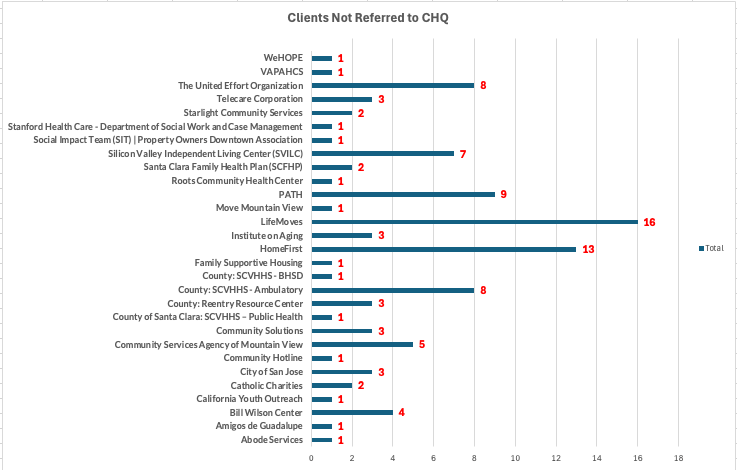
Clients Assessed & Not Referred to CHQ


This report helps you identify if you've completed a VI-SPDAT Assessment for a client but forgot to refer it to the Community Housing Queue (CHQ). Running this report is crucial to ensure you're not inadvertently hindering your clients' housing opportunities. Use this link to access the How to Guide. 


Upcoming Events

calendar-icon-navy


Technical Administrator (TA/Agency Lead Meeting) | August 3, 2026 2:00pm - 3:30 pm

These meetings discuss the Agency Administrator reports and data collection requirements in HMIS. Additionally, updates regarding changes and/or upcoming changes to HMIS are explored in an effort to ascertain impacts on programs and/or end users. Furthermore breakout sessions allow for exploration of the understanding of ongoing data updates, and/or challenges being experienced by end users.


SCC HMIS Looker - HMIS Report Spotlight Office Hours | September 14, 17 & 31, 2026 2:00pm - 3:00pm Register here

We know that lots of issues and questions can arise when using Clarity (HMIS) and Looker. Office Hours are a great opportunity to get your questions answered, see demos of anything you can't figure out or can't remember how to do, find out how to fix things that might have gotten messed up, and participate in discussions with other users around solutions to common challenges.

 

HMIS Clarity Office Hours | September 10 & 24 2026 10:00am - 11:30am Join here

We know that lots of issues and questions can arise when using Clarity (HMIS). Office Hours are a great opportunity to get your questions answered, see demos of anything you can't figure out or can't remember how to do, find out how to fix things that might have gotten messed up, and participate in discussions with other users around solutions to common challenges.



Bitfocus is Hiring

bitfocus Checkmark small


Join our Team!

  • Work with us at Bitfocus! Join a team committed to innovation, collaboration, and real-world impact in human services.  

Questions?

Your HMIS Administrators are happy to help.

Photos of Lesly and Bryanna

Phone: 408.596.5866 Ext. 2

Email: sccsupport@bitfocus.com